How to Set Up Round-Robin Meetings for Your Sales Team
A complete guide to round-robin scheduling for sales teams. Learn how to distribute leads fairly, respond faster, and boost conversion rates with automated meeting assignment.

If you have ever managed a sales team, you know the frustration. Leads come in at all hours. Some reps are drowning in back-to-back calls while others are sitting idle. Prospects wait hours (sometimes days) for someone to respond, and by the time your team reaches out, the lead has already booked a demo with a competitor.
The way you distribute incoming meetings across your sales team is not a minor operational detail. It directly impacts your speed-to-lead, your conversion rates, your team morale, and ultimately your revenue. Yet most teams still rely on some combination of gut feel, spreadsheet tracking, and "whoever sees the notification first" to route inbound leads.
There is a better way. Round-robin scheduling automates meeting assignment so that every lead gets a fast response, every rep gets a fair share, and your sales org runs like the well-oiled machine it should be.
In this guide, we will walk through exactly what round-robin meetings are, why they matter so much for sales teams, and how to set them up step by step in Proximity. Whether you are running a team of four SDRs or scaling a global sales operation, this is the playbook you need.
What is round-robin scheduling?
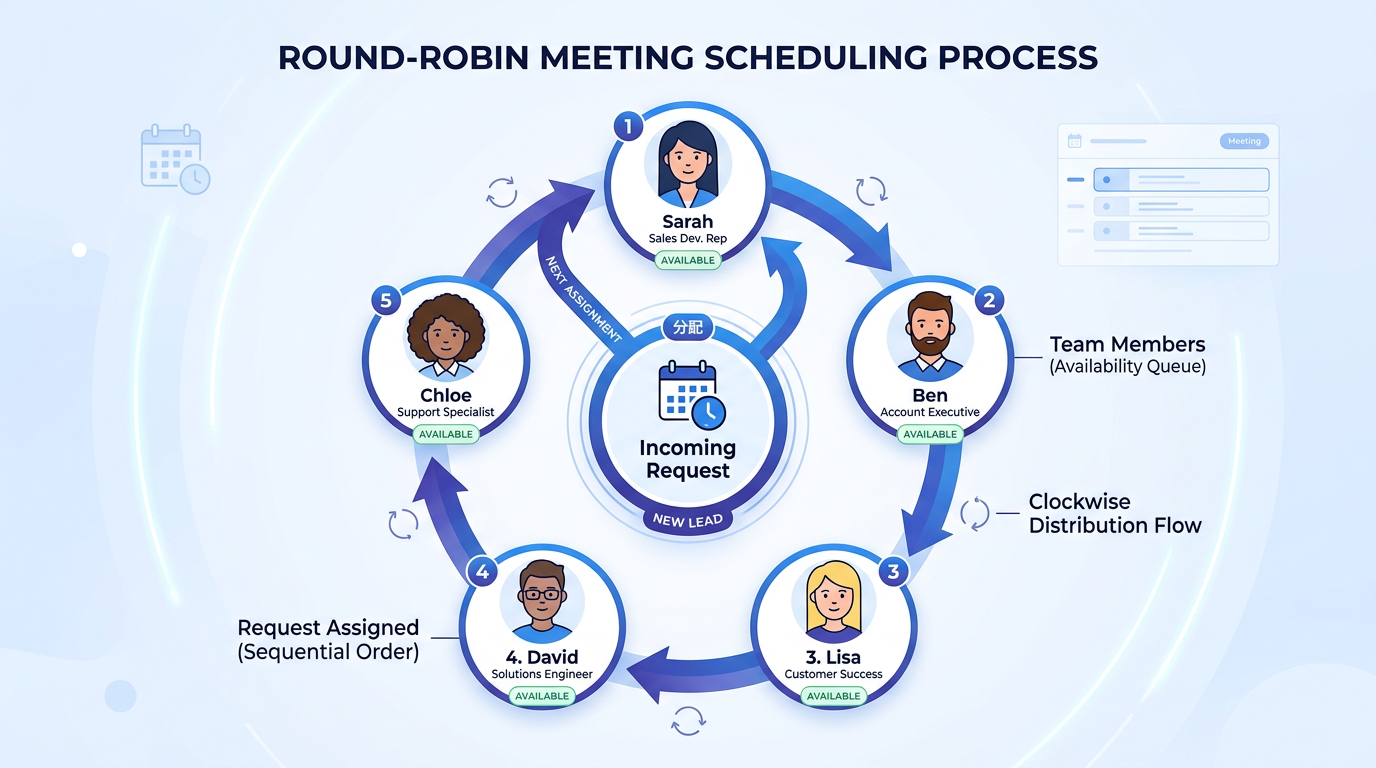
Round-robin scheduling is a method of distributing incoming meeting requests across a team in a rotating, automated sequence. When a prospect clicks your booking link and selects a time, the system assigns them to the next available team member instead of always routing to the same person.
Think of it like dealing cards at a poker table. The first lead goes to Rep A, the second to Rep B, the third to Rep C, and so on. Once everyone has been assigned a meeting, the cycle starts over. The beauty of modern round-robin systems is that they go well beyond this basic rotation. They factor in real-time calendar availability, timezone differences, existing workload, and even custom priority rules.
Here is a concrete example. Say you have a five-person SDR team handling inbound demo requests. Without round-robin, the rep whose name is listed first on your booking page might get 40% of all bookings while the rep at the bottom gets 10%. With round-robin scheduling, each rep gets roughly 20% of the meetings, and the system automatically skips anyone who is already booked, on vacation, or outside their working hours.
The result? Faster response times for prospects, a balanced workload for your reps, and a much simpler life for your sales managers.
Why sales teams need round-robin scheduling
You might be thinking: "We are a small team, we can just handle this manually." And sure, that works when you have two or three reps and a handful of inbound meetings per week. But the moment your team starts to grow, manual lead distribution breaks down fast. Here is why round-robin meetings are so critical for sales organizations.
Speed-to-lead is everything
The data on this is overwhelming. A study by Lead Connect found that 78% of customers buy from the company that responds first. Harvard Business Review research showed that companies who contact leads within five minutes are 21 times more likely to qualify those leads compared to companies that wait 30 minutes. And InsideSales.com data revealed that the odds of making contact with a lead drop 10x after the first five minutes.
Round-robin scheduling tackles this head on. Because the system assigns the meeting to the next available rep instantly, the prospect gets a confirmed booking in seconds rather than waiting for someone to manually review and route their request. That speed advantage compounds over hundreds of leads per month.
Equal distribution prevents burnout and politics
Without automation, meeting distribution is almost never fair. Reps whose names appear first in a list or who happen to be online when leads come in end up with a disproportionate share. Over time, this creates resentment. Top performers feel overworked. Newer reps feel like they never get enough at-bats to develop their skills.
Round-robin scheduling removes the politics entirely. Everyone knows the system is fair because the data proves it. Managers spend less time mediating disputes about lead quality and more time coaching reps on how to close.
Timezone coverage without the headaches
If your team spans multiple timezones (and increasingly, most sales teams do), round-robin is a game changer. Instead of routing all meetings to a single timezone and hoping for the best, the system can automatically assign meetings to reps who are actually working during the requested time slot.
A prospect in London booking a 9 AM meeting will be matched with your EMEA rep, not your rep in San Francisco who is still asleep. This gives your team effective around-the-clock coverage without requiring anyone to take calls at unreasonable hours.
Reduced bottlenecks and single points of failure
What happens when your top-performing rep goes on vacation? Or gets sick? Or leaves the company? If all your leads are flowing through one or two people, you have a serious business continuity problem. Round-robin scheduling distributes risk across the entire team. If someone is unavailable, the system simply skips them and assigns to the next person. No leads fall through the cracks.
How round-robin compares to other lead distribution methods
Round-robin is not the only way to distribute leads, of course. Let's look at how it stacks up against the alternatives.
Manual assignment
This is where most small teams start. A manager or team lead reviews incoming requests and manually assigns them to reps. The advantage is full control. The downsides are significant: it is slow (adding minutes or hours to response time), it does not scale, and it introduces bias, whether intentional or not.
Best for: Very small teams (2-3 people) with low meeting volume.
Territory-based routing
Leads are assigned based on geography, industry, or company size. Rep A handles all leads from the Northeast, Rep B handles the West Coast, and so on. This works well for field sales teams or organizations with specialized regional knowledge. But it can create uneven workloads if one territory is more active than another, and it does nothing to help with speed-to-lead.
Best for: Field sales teams and organizations with strong regional specialization.
Skills-based routing
Leads are matched to reps based on expertise. Enterprise leads go to your most experienced closers, while SMB leads go to newer reps. This can improve conversion rates on high-value deals. But it creates the same bottleneck and fairness problems as manual assignment, just with a more structured framework around it.
Best for: Teams with clearly segmented deal sizes and specialized skill sets.
Round-robin (automated rotation)
Leads are distributed automatically in a rotating sequence, with rules for availability, equity, and priority. It optimizes for both speed and fairness, and it scales effortlessly from 3 reps to 300.
Best for: Most sales teams, especially those focused on inbound lead conversion and fast growth.
The smartest organizations often combine these approaches. For example, you might use a routing form to segment leads by company size first, then apply round-robin within each segment. Enterprise leads go to a round-robin pool of senior AEs, while SMB leads go to a separate pool of SDRs. You get the specialization of skills-based routing with the speed and fairness of round-robin.
Step-by-step: setting up round-robin meetings in Proximity
Now let's get practical. Here is exactly how to set up round-robin scheduling in Proximity, from creating your team to sharing your booking link. The whole process takes about ten minutes.
Step 1: Create your team
Navigate to the Teams page in Proximity and click Create Team. Give your team a descriptive name like "Inbound Sales" or "Demo Requests" so it is easy to identify later.
Add every sales rep who should be part of the round-robin pool. Each person needs to have their own Proximity account with their calendar connected. If someone has not connected their Google or Microsoft calendar yet, ask them to do that first. Calendar connectivity is what makes the real-time availability checks work.
Pro tip: Keep your round-robin pools focused. A team of 4-8 reps is the sweet spot. If you have 20 reps, consider creating multiple pools segmented by region, deal size, or product line.
Step 2: Create a round-robin event type
Go to Event Types and click Create Event Type. Select Round-Robin as the scheduling method and associate it with the team you just created.
Configure the basics:
- Meeting title: Something the prospect will see, like "Sales Demo" or "Discovery Call"
- Duration: 30 minutes is standard for initial sales calls. You can offer multiple duration options if needed.
- Location: Choose your video conferencing tool (Zoom, Google Meet, or Microsoft Teams). Proximity will auto-generate a unique meeting link for each booking.
- Buffer time: Add at least 10-15 minutes between meetings so reps have time to take notes and prepare for the next call.
- Minimum scheduling notice: Set this to at least 2 hours so reps have time to prepare. For enterprise demos, 24 hours is more appropriate.
Step 3: Configure availability windows
Each team member should have their availability set in their Proximity profile. This controls when prospects can book time with them.
For most sales teams, availability looks something like Monday through Friday, 9 AM to 5 PM in each rep's local timezone. But you can get more specific. Maybe your team blocks out Friday afternoons for internal meetings, or certain reps prefer morning calls. The system respects all of these preferences and only shows prospects the time slots where at least one rep is genuinely available.
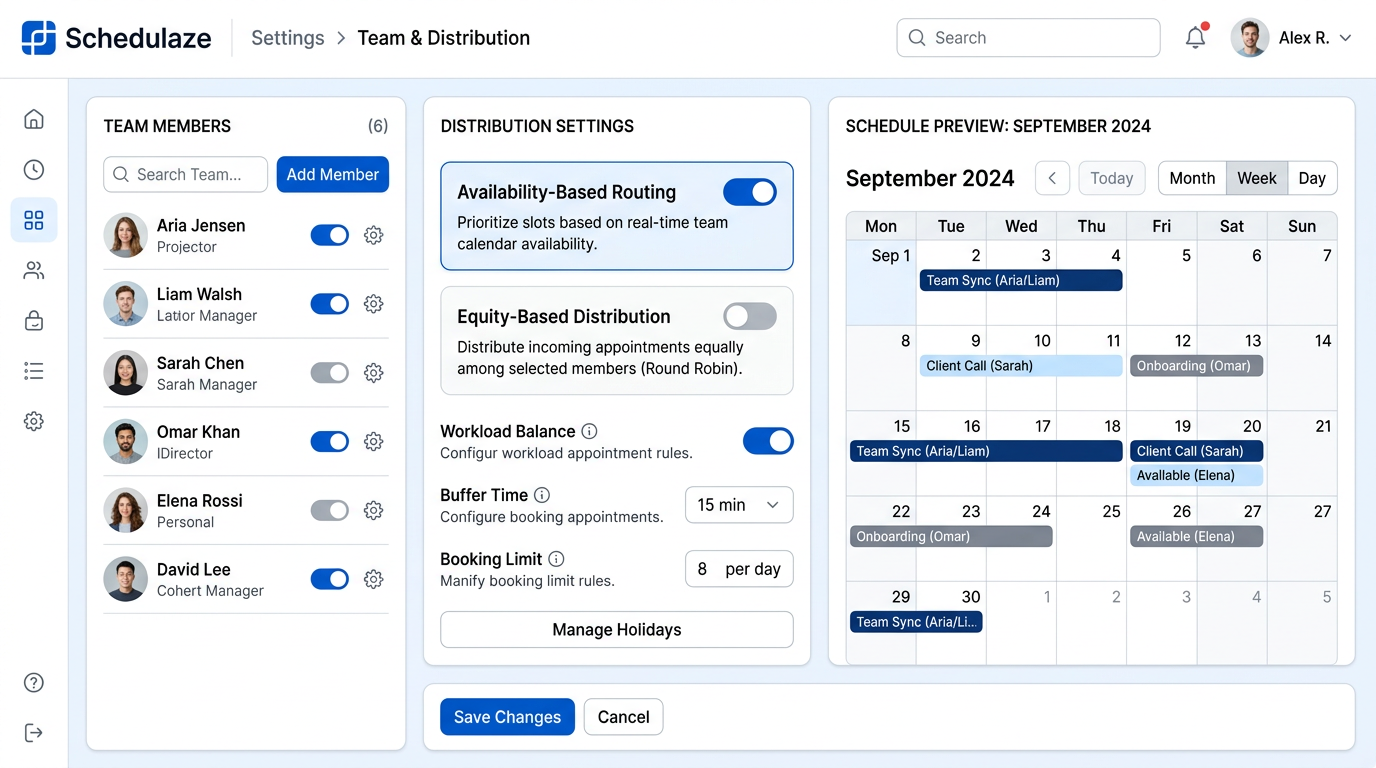
Step 4: Choose your distribution strategy
This is where round-robin gets interesting. Proximity offers several distribution modes, and the right choice depends on your team's priorities. We will dive deeper into each strategy in the next section, but here is the quick overview:
- Optimize for availability: Assigns to whoever has the most open calendar slots. Great for maximizing booking conversion.
- Optimize for equity: Tracks meeting counts and assigns to whoever has the fewest. Great for fairness.
- Weighted distribution: Lets you assign priority percentages to each rep. Great for ramping new hires or rewarding top performers.
Step 5: Share your booking link
Once everything is configured, grab your team booking link. It looks something like proximity.io/your-team/sales-demo. This single link is all you need. Drop it on your website, embed it in your email campaigns, add it to your CRM as a custom field, or include it in your chatbot flows.
Every time someone books through this link, the round-robin engine fires and assigns the meeting to the right rep automatically. The prospect sees a confirmation page with their assigned rep's name and photo, and both parties receive a calendar invitation.
Distribution strategies explained
Choosing the right distribution strategy is one of the most impactful decisions you will make when setting up round-robin meetings. Let's break down each option in detail.
Availability-based distribution
The system looks at everyone's calendar in real time and assigns the meeting to whichever rep has the most open slots in the upcoming period. This strategy maximizes the chances that a prospect will find a time that works, because the rep with the most availability is statistically more likely to match the prospect's preferred slot.
When to use it: When your top priority is booking conversion rate and you want to minimize the chance of a prospect seeing "no times available."
Watch out for: Over time, reps with lighter calendars (fewer internal meetings, less pipeline activity) can end up getting more inbound leads. This can create an unintended feedback loop.
Equity-based distribution
The system tracks how many meetings each rep has been assigned over a rolling period (typically the last 30 days) and assigns the next meeting to whoever has the fewest. If Rep A has had 15 meetings this month and Rep B has had 12, the next lead goes to Rep B.
When to use it: When fairness is paramount. This is the most popular strategy for teams where reps are compensated partly based on meeting volume, or where managers want to ensure equal development opportunities.
Watch out for: If a rep has low availability (maybe they are part-time or have many internal commitments), they may consistently receive leads they cannot actually take, creating a frustrating experience for prospects.
Weighted distribution
You assign a weight or priority percentage to each rep. For example, your senior AE might have a weight of 2 while a newer rep has a weight of 1, meaning the senior AE receives roughly twice as many leads. This is flexible enough to handle all kinds of scenarios.
When to use it: When you are ramping new hires and want to control their volume, when you have part-time reps, or when you want to route a higher share of leads to your top closers.
Watch out for: Weights need periodic adjustment as your team evolves. Set a calendar reminder to review them quarterly.
Hybrid approaches
The most sophisticated sales teams combine strategies. For example, you might use equity-based distribution as the primary method but add a rule that skips any rep who has fewer than 3 open hours this week. Or you might use weighted distribution for your enterprise pool but strict equity for your SMB pool.
Proximity lets you layer these rules so you can build exactly the distribution logic your team needs, without writing any code or begging your ops team for help.
Advanced techniques for round-robin power users
Once you have the basics running, here are some advanced techniques that separate good sales operations from great ones.
Combine round-robin with routing forms
A routing form is a short questionnaire that prospects fill out before they see the booking calendar. This is incredibly powerful when combined with round-robin because it lets you segment leads before they enter the pool.
For example, your routing form might ask: "How many employees does your company have?" If the answer is over 500, the lead is routed to your enterprise round-robin team. If under 500, they go to your SMB team. If under 10, they might be redirected to a self-serve signup page instead of a live demo.
This pre-qualification step ensures that your best reps are spending their time on the leads most likely to convert, while still providing a great experience for every prospect.
Automate the entire meeting lifecycle with workflows
The meeting booking is just the beginning. What happens between the booking and the actual call matters enormously. With Proximity's workflow engine, you can automate the full sequence:
- Immediate confirmation: Send a personalized email thanking the prospect for booking and including a brief agenda or prep questions.
- 24-hour reminder: Send a reminder with the meeting link and a note from their assigned rep.
- 1-hour reminder: A final nudge with the meeting link front and center.
- Internal notification: Post a message to your team's Slack channel so everyone knows a new demo is on the books.
- Post-meeting follow-up: Automatically send a thank-you email with next steps and relevant resources.
Teams using automated meeting workflows report up to 40% fewer no-shows compared to teams that rely on manual reminders. That alone can make a meaningful difference in your monthly conversion numbers.
Monitor everything with analytics
You cannot improve what you do not measure. Keep a close eye on these round-robin metrics:
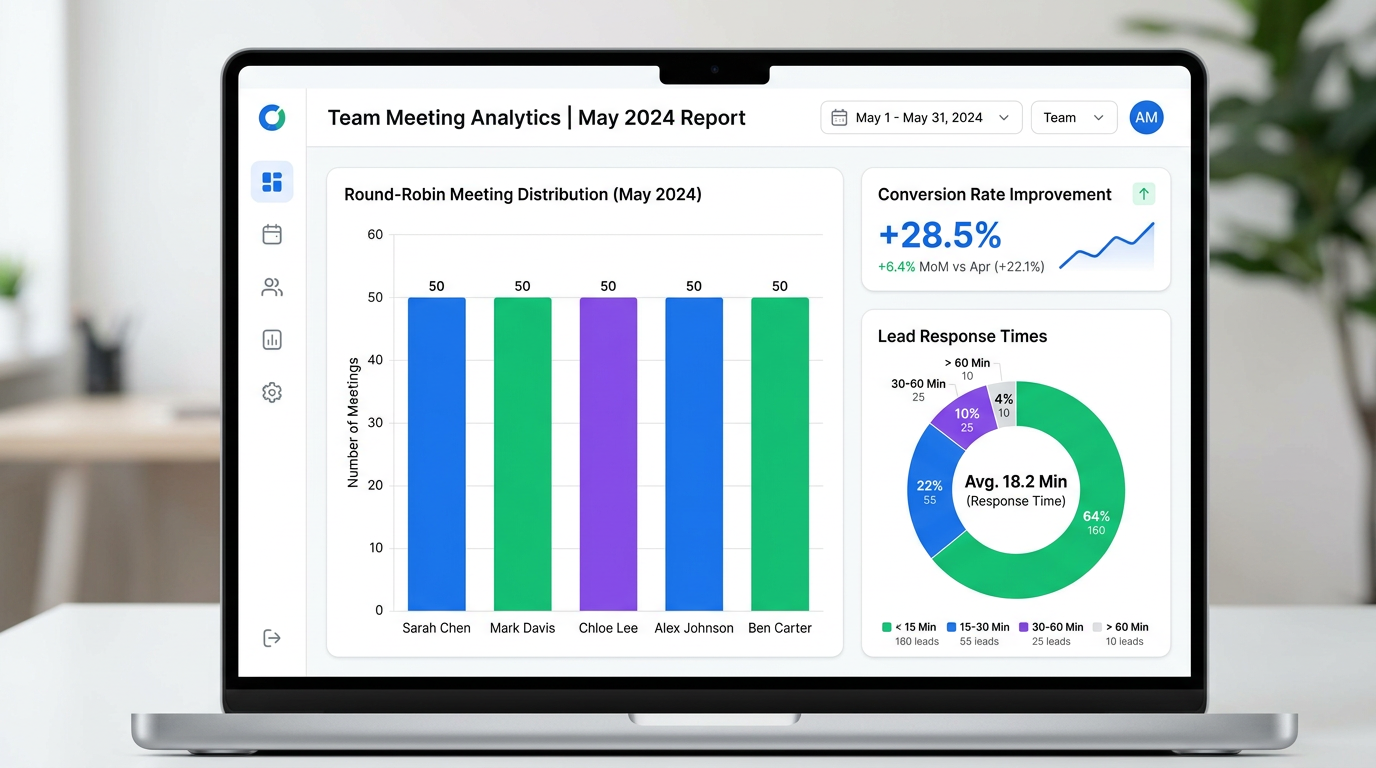
- Meetings per rep per week: Is distribution actually even? If one rep consistently gets more, check their availability settings.
- Booking conversion rate: What percentage of people who land on your booking page actually complete a booking? If this drops below 60%, you may need more available time slots.
- Speed-to-meeting: How quickly after a lead's initial interest are they getting on a call? Best-in-class teams get this under 24 hours.
- Show rate: What percentage of booked meetings actually happen? If it is below 80%, strengthen your reminder workflows.
- Lead-to-opportunity conversion: The ultimate metric. Are round-robin assigned meetings converting into pipeline at a healthy rate?
Review these numbers weekly with your team. Small adjustments to distribution rules, availability windows, or follow-up sequences can produce compounding improvements over time.
Common mistakes to avoid
After working with hundreds of sales teams on their round-robin setup, here are the pitfalls we see most often.
1. Making your round-robin pool too large
If you have 15 reps in a single round-robin pool and the system has to cycle through all of them before anyone gets a second meeting, individual reps might go days between inbound leads. This kills momentum and makes it hard for reps to develop a rhythm. Keep pools between 4 and 8 people. If you need to include more reps, create multiple specialized pools.
2. Ignoring calendar hygiene
Round-robin only works as well as the calendar data it reads. If reps are not blocking off time for internal meetings, personal appointments, or focus work, the system might assign them meetings during times they are not actually available. This leads to rescheduling, which frustrates prospects and erodes trust. Set a team standard: if you are busy, block it on your calendar.
3. Never adjusting your distribution rules
Your team is not static. People join, people leave, reps get promoted, territories shift. If you set up round-robin once and never revisit it, the system will drift out of alignment with your actual needs. Schedule a quarterly review of your distribution rules, weights, and team membership.
4. Skipping the routing form
Sending every inbound lead directly to your sales team, regardless of fit, wastes your reps' time and frustrates prospects who are not ready for a sales conversation. Even a simple two-question routing form can dramatically improve lead quality and allow your reps to focus on conversations that are likely to convert.
5. Not setting up follow-up workflows
A booked meeting is not a closed deal. If you are not sending confirmation emails, reminders, and prep materials automatically, you are leaving money on the table. No-show rates for meetings without automated reminders typically run 25-30%. With proper workflows, you can cut that to 10-15%.
Real results and benchmarks
Numbers speak louder than promises. Here is what sales teams are actually seeing after implementing round-robin scheduling with proper distribution rules and automated workflows.
Speed-to-lead improvement: Teams that switch from manual assignment to automated round-robin typically see response times drop from an average of 4-6 hours to under 5 minutes. For organizations with high inbound volume, this alone can increase qualified pipeline by 15-25%.
Workload balance: Before round-robin, it is common to see a 3:1 or 4:1 ratio between the busiest rep and the least busy rep on a team. After implementation, most teams achieve a ratio of 1.2:1 or better, meaning the busiest rep has only about 20% more meetings than the least busy.
Booking conversion rates: When prospects can instantly see available times and get a confirmed meeting in seconds, booking page conversion rates typically climb to 65-75%, compared to 40-50% for pages that require manual follow-up.
No-show reduction: Automated reminder workflows reduce no-show rates from the industry average of 20-25% down to 10-12%. For a team booking 200 meetings per month, that means 20-30 additional meetings that actually happen.
Overall pipeline impact: Combining faster response times, better distribution, higher booking rates, and lower no-shows, sales teams regularly report a 25-40% increase in qualified pipeline within the first quarter of implementing round-robin scheduling.
These are not theoretical numbers. They are benchmarks drawn from real sales organizations that made the switch from manual processes to automated meeting assignment automation.
Getting started
If your sales team is still distributing leads manually, routing meetings through a shared inbox, or relying on whoever-sees-it-first assignment, you are leaving revenue on the table every single day. Round-robin scheduling is not a nice-to-have optimization. It is foundational infrastructure for any sales team that cares about speed, fairness, and conversion.
The good news is that setting this up is not a massive project. With Proximity, you can go from zero to a fully operational round-robin system in under 15 minutes. Create a team, configure your event type, set your distribution rules, and share your link. That is it.
Your prospects will get faster responses. Your reps will get fairer workloads. Your managers will get cleaner data. And your pipeline will reflect all of it.
Explore our team scheduling features to see how round-robin fits into the bigger picture, or jump straight in and get started with Proximity. Your first team booking link is free.