Data-Driven Scheduling Decisions
Booking trends, peak demand times, team performance, conversion rates. All in one dashboard, all designed to help you act.
You can't improve what you can't measure
How many meetings did your team handle last month? What's your no-show rate? Who's booking the most? Most scheduling tools give you a list of past meetings and call it analytics. That's not insight. It's a spreadsheet.
Analytics built for scheduling professionals
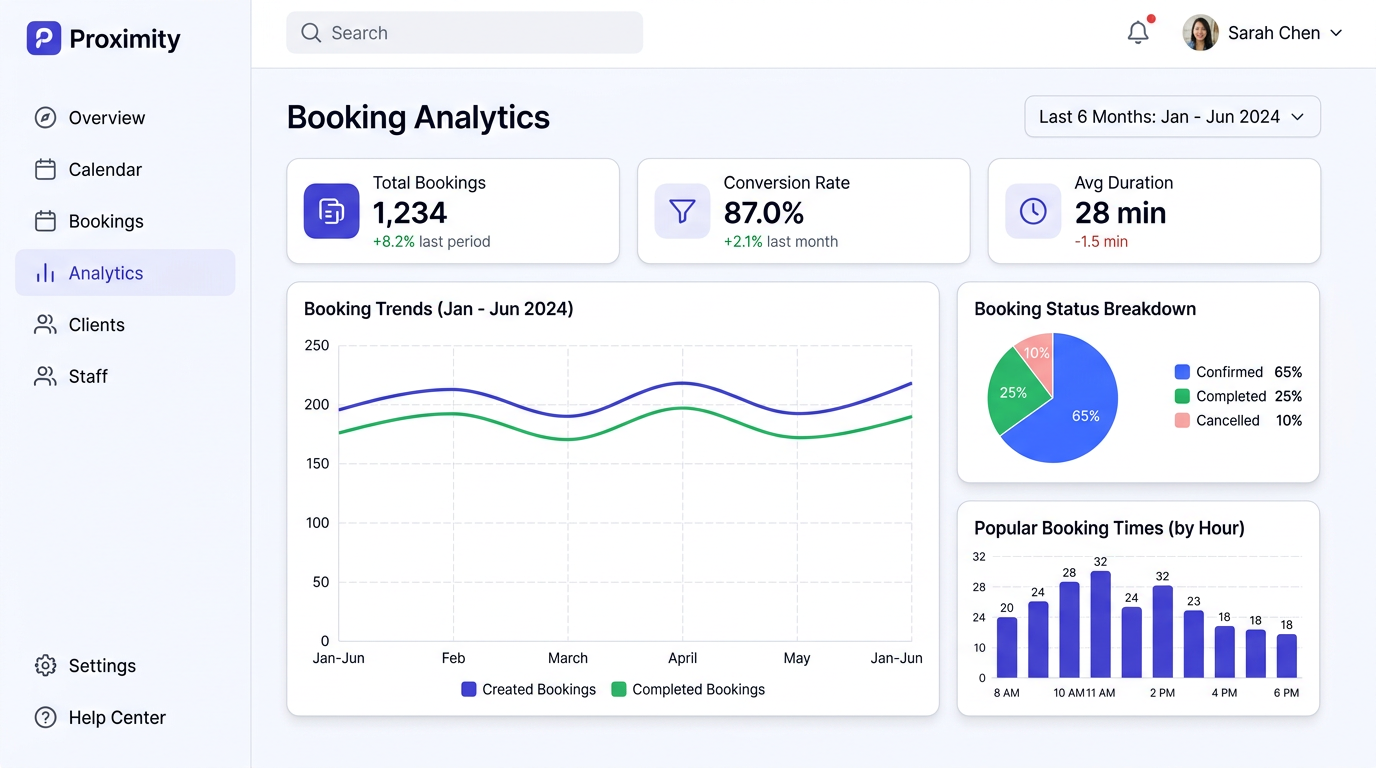
Proximity's dashboard shows you what matters at a glance. Spot booking trends, find your busiest hours, track how many page views turn into confirmed bookings, and compare how your team is performing.
Key Capabilities
How It Works
Open your dashboard
Your analytics dashboard is the first thing you see when you log in to Proximity.
Explore the data
View booking trends, popular times, and status breakdowns. Filter by date range or event type.
Identify patterns
Spot trends like increasing no-show rates or seasonal demand changes.
Take action
Adjust your availability, add reminders, or redistribute team load based on real data.
Analytics included, not gated
Competitors reserve analytics for enterprise tiers. Proximity includes the full analytics dashboard on every plan. Understanding your scheduling performance shouldn't be a paid upgrade.
Use Cases
Sales Managers
Track team meeting volume, conversion rates, and identify top performers to replicate their success.
Solo Consultants
Understand your busiest days and times to optimize your availability and pricing.
Operations Teams
Monitor no-show rates and adjust reminder workflows to reduce wasted time.
HR Teams
Track interview scheduling metrics to identify bottlenecks in your hiring pipeline.
Get started with Booking Analytics
No credit card required. Free plan available forever.