Qualify Guests Before They Book
Use multi-step routing forms to screen and direct guests to the right meeting, team member, or resource. All before a single calendar slot is used.
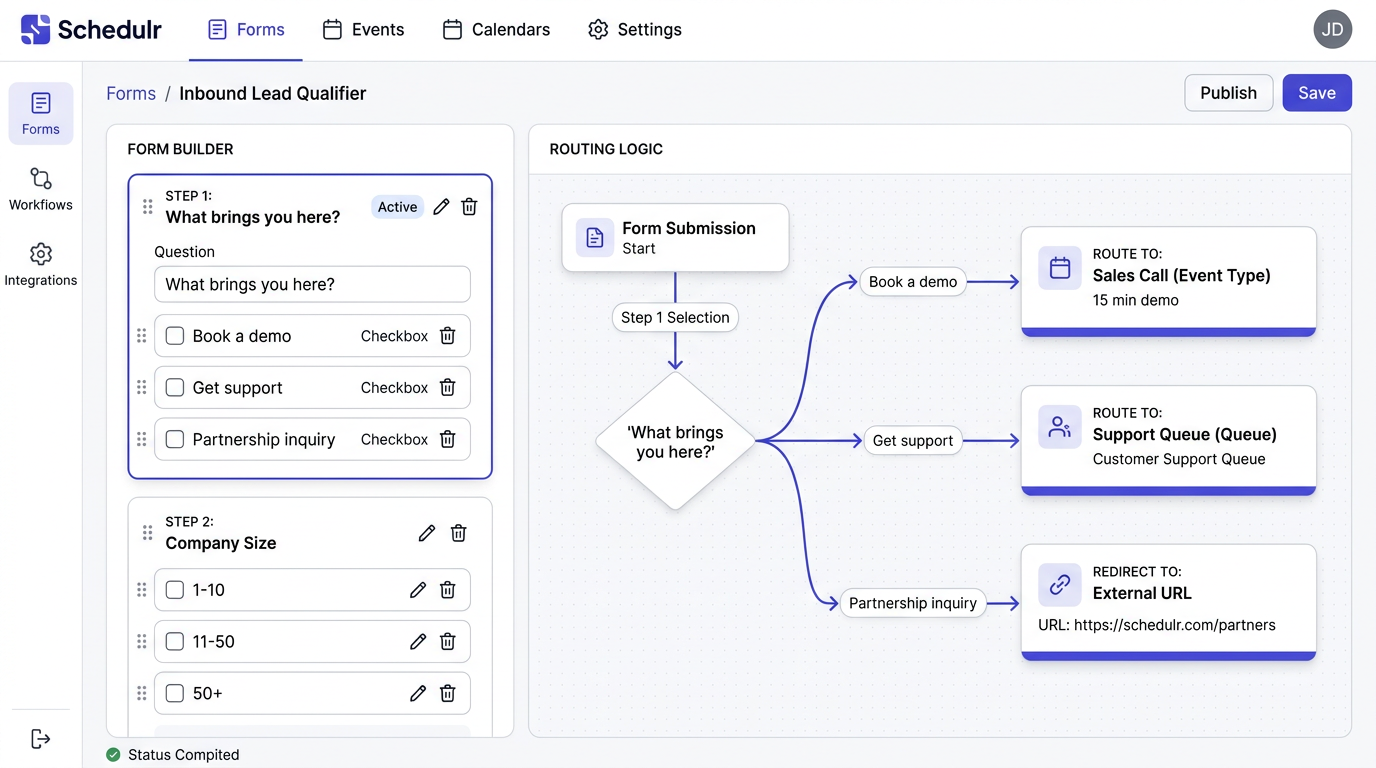
Not every booking request deserves a meeting
Without any filtering, your calendar fills up with unqualified leads and people who'd be better off reading your docs. You end up spending your best hours on low-value conversations while the people who actually need you wait.
Smart routing that protects your time
Proximity routing forms sit between the guest and your booking page. Ask qualifying questions, score their responses, and send them to the right place: a specific event type, the right team member, a helpful resource, or a polite "not a fit" message.
Key Capabilities
How It Works
Build your form
Add questions with multiple choice, dropdowns, or text inputs. Create multiple steps if needed.
Define routing rules
Map each answer combination to a destination: an event type, team member, URL, or disqualification.
Publish the form
Share the form URL or embed it on your website. Guests see the form before the calendar.
Analyze results
Track completion rates, routing outcomes, and identify where guests drop off.
Routing forms on Standard, not Enterprise
Competitors restrict routing forms to their highest-tier plans ($16+/seat/month). Proximity includes routing forms with full conditional logic on the Standard plan at $5/seat/month.
Use Cases
Lead Qualification
Ask about company size, budget, and timeline before routing qualified leads to sales and unqualified ones to self-serve resources.
Customer Support Triage
Ask what the issue is about and route technical problems to engineering, billing issues to finance, and general inquiries to support.
Event Registration
Screen attendees for eligibility and route them to the appropriate session or workshop.
Partner Onboarding
Qualify potential partners before they book an introductory call, saving your team from unproductive meetings.