Best Free Scheduling Tools for Small Businesses in 2026 (Honest Comparison)
A straightforward comparison of the best free scheduling tools for small businesses in 2026. We break down what you actually get for free, what is paywalled, and which tool delivers the most value.
Why free scheduling tools matter for small businesses
Running a small business means making every dollar count. You have a hundred things competing for your budget, from payroll to marketing to software licenses, and spending money on a scheduling tool can feel hard to justify when your calendar app already lets you create events.
But here is the thing: the hidden cost of manual scheduling is almost always higher than the cost of a good tool. Every time you go back and forth over email to find a meeting time, every time a client no-shows because they forgot, every time you manually copy-paste a Zoom link into a calendar invite, you are spending time you could be spending on billable work, sales calls, or actually running your business.
The good news is that there are genuinely good free scheduling tools available in 2026. You do not have to spend anything to get a professional booking link, calendar sync, and basic automation. But "free" means different things to different companies, and the gap between what each tool offers on its free plan versus what is locked behind a paywall can be surprisingly large.
This article is an honest comparison of the five most popular free scheduling tools for small businesses. We are not going to rank them based on which one pays us the most in affiliate commissions (we do not run affiliate programs). We are going to look at what you actually get for free, where each tool shines, and which one makes sense depending on your situation.
Full disclosure: Proximity is one of the tools we are comparing, and we built it. We will be transparent about where our competitors do things well, and we will let you make your own decision.
The five tools we are comparing
Here is the lineup:
- Proximity - Modern scheduling built for teams and individuals
- Calendly - The most well-known scheduling tool on the market
- Cal.com - Open-source scheduling with a developer-friendly approach
- TidyCal - A budget-friendly tool with a lifetime deal option
- SavvyCal - A scheduling tool focused on the guest experience
We picked these five because they represent the range of options available: from the market leader (Calendly) to open-source (Cal.com) to lifetime-deal bargains (TidyCal) to more opinionated approaches (SavvyCal and Proximity). Each one has a free or very affordable entry point that makes it accessible to small businesses.
What you actually need from a scheduling tool
Before we dive into the comparison, it helps to know what matters. Not every feature is equally important, and the "best" tool depends entirely on your priorities. Here are the capabilities that make the biggest difference for small businesses:
A booking page that looks professional. Your scheduling link is often the first interaction a prospect has with your brand. If it looks generic or cluttered, it sets the wrong tone.
Calendar sync that works reliably. The entire point of a scheduling tool is to show your real availability. If it does not sync with your Google Calendar or Outlook in real time, you are going to end up with double-bookings.
Timezone handling. If you work with clients in different cities or countries, automatic timezone detection is not optional. It is essential.
Basic reminders. At minimum, you want confirmation emails when someone books and a reminder before the meeting. This alone can cut your no-show rate significantly.
Room to grow. You might be solo now, but if your business grows and you hire a team, you do not want to have to migrate to a completely different platform. A tool with affordable paid tiers and team features gives you a growth path.
Now let's see how each tool measures up.
Proximity
Free plan overview
Proximity's free plan is designed to give you a fully functional scheduling setup with no time limit and no credit card required. Here is what you get:
- 1 event type
- 1 calendar connection (Google Calendar or Outlook)
- A branded booking page with your name, photo, and custom colors
- Timezone detection for your guests
- Confirmation emails
- Video conferencing integration (Zoom, Google Meet, Microsoft Teams)
The free plan covers the essentials for a solo professional who runs one type of meeting, like a 30-minute consultation call or a 15-minute intro chat.
What you unlock on paid plans
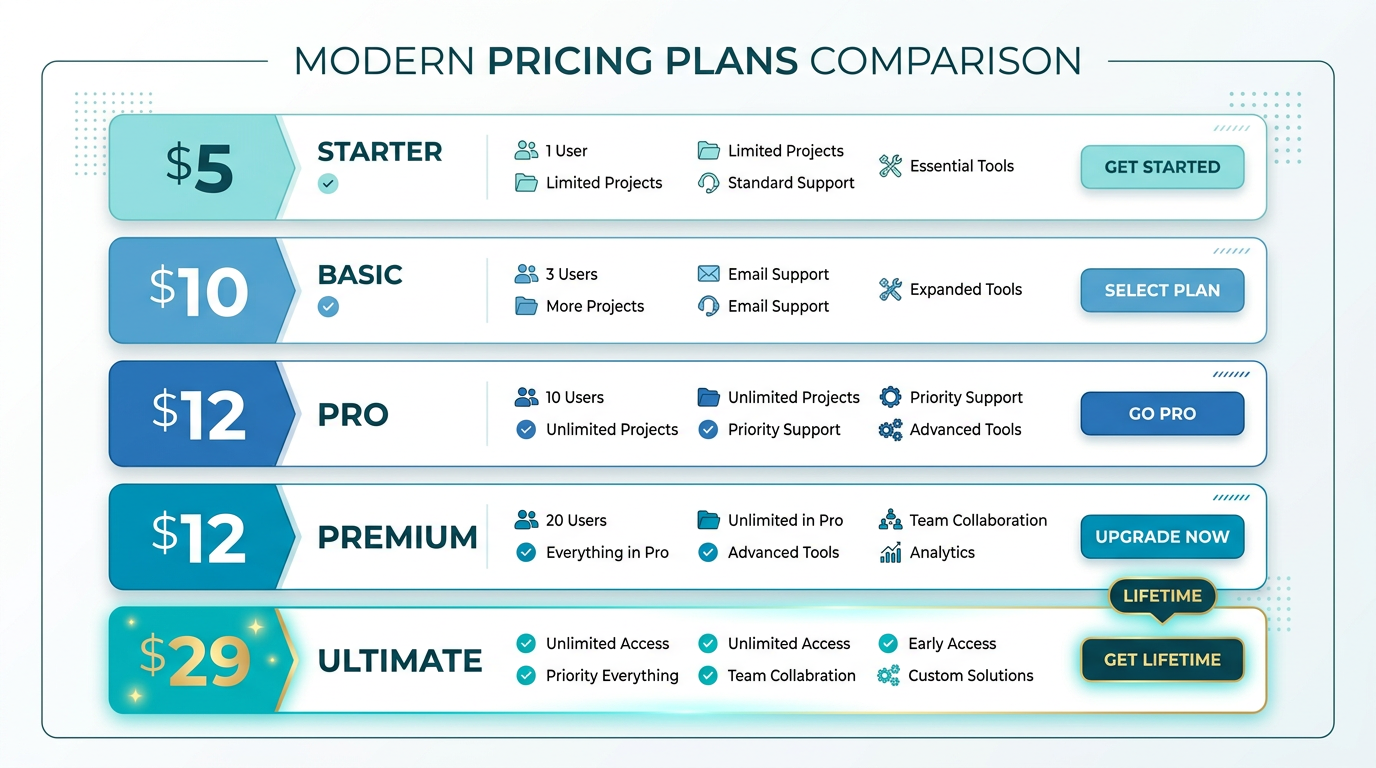
Proximity's Standard plan runs $5 per seat per month (billed monthly) or $4 per seat per month on annual billing. For that price, you get:
- Unlimited event types
- Unlimited calendar connections with cross-calendar conflict detection
- Full workflow automation (email, SMS, Slack, webhooks)
- Team scheduling with round-robin and collective meetings
- Routing forms with conditional logic
- Custom branding (full control over colors, logo, and CSS)
- Remove Proximity branding
- Booking analytics
The Teams plan at $12 per seat per month adds team groups, custom domains, admin controls, and priority support.
Who Proximity is best for
Small businesses that want a clean, modern booking experience and anticipate needing team features as they grow. Proximity's pricing is aggressive. At $5 per seat per month for the Standard plan, you get features that competitors charge $12 to $16 per seat for, including workflow automation and routing forms. If value per dollar matters to you, Proximity is hard to beat.
Where Proximity falls short
The free plan is limited to one event type and one calendar. If you run multiple meeting types (say, a discovery call and a follow-up demo), you will need to upgrade. The platform is also newer than Calendly, which means the integration ecosystem is still growing.
Calendly
Free plan overview
Calendly is the name most people think of when they hear "scheduling tool," and for good reason. They have been around since 2013 and have millions of users. Their free plan includes:
- 1 event type
- 1 calendar connection
- Booking page with limited customization
- Timezone detection
- Basic email notifications
- Integration with Zoom, Google Meet, and Microsoft Teams
What you unlock on paid plans
Calendly's paid plans start at $10 per seat per month for the Standard plan, which adds unlimited event types, multiple calendar connections, custom branding, automated workflows, and integrations with tools like Salesforce and HubSpot.
The Teams plan at $16 per seat per month adds routing forms, round-robin scheduling, and admin features. The Enterprise plan pricing is custom.
Who Calendly is best for
Businesses that prioritize a wide integration ecosystem and want a tool with extensive third-party support. Calendly integrates with more platforms than any other scheduling tool on this list, including native CRM integrations, marketing automation tools, and payment processors. If you already use Salesforce or HubSpot and want a scheduling tool that plugs directly into your existing stack with minimal setup, Calendly is a safe choice.
Where Calendly falls short on free
Calendly's free plan is one of the more restrictive in the category. You get a single event type and limited booking page customization. The booking pages carry Calendly branding, and you cannot change the color scheme or add your own logo without upgrading. For small businesses that care about brand consistency, this can be a dealbreaker.
Pricing is also worth noting. At $10 per seat per month for Standard and $16 per seat per month for Teams, Calendly is one of the more expensive options, especially for small teams. Features like routing forms and round-robin, which Proximity includes at $5 per seat, require the $16-per-seat Teams plan on Calendly.
Cal.com
Free plan overview
Cal.com takes an open-source approach to scheduling. Their free plan is one of the most generous in terms of raw feature count:
- Unlimited event types
- 1 calendar connection
- Booking pages
- Timezone detection
- Basic notifications
- You can also self-host the entire platform for free if you have the technical resources
What you unlock on paid plans
Cal.com's Team plan starts at $12 per seat per month and adds team scheduling (round-robin, collective), managed event types, workflow automation, and admin features. Their Enterprise plan adds custom SLA, SSO, and compliance features.
Who Cal.com is best for
Developer-heavy teams and businesses that value open-source software. If your team has the technical capability to self-host and you want full control over your scheduling infrastructure, Cal.com is unique in offering that option. The unlimited event types on the free plan is also appealing for individuals who run many different meeting types.
Where Cal.com falls short
The user interface, while functional, is not as polished as Calendly or Proximity. The booking page design feels more utilitarian than professional, which can matter if your scheduling link is client-facing. Workflow automation is limited on the free plan, and you need the $12-per-seat Team plan for features like round-robin that are available at lower price points elsewhere.
For non-technical users, Cal.com can also feel overwhelming. The settings are extensive and the self-hosting option, while powerful, requires server management knowledge that most small business owners do not have.
TidyCal
Free plan overview
TidyCal made a splash by offering a lifetime deal through AppSumo, and it remains one of the most affordable scheduling options available. The free plan includes:
- 1 event type
- 1 calendar connection
- Basic booking page
- Timezone detection
- Email notifications
What you unlock on paid
TidyCal's paid plan is $29 one-time (lifetime) through AppSumo, which is genuinely remarkable. For that one-time payment, you get unlimited event types, multiple calendar connections, custom branding, group scheduling, and payment collection through Stripe.
Who TidyCal is best for
Solo entrepreneurs and freelancers who want the cheapest possible scheduling solution and do not need team features. The lifetime deal is unbeatable in terms of raw cost. If you are a freelance consultant or coach who books one-on-one sessions and wants to stop paying monthly fees, TidyCal is worth a serious look.
Where TidyCal falls short
TidyCal is a small team building a product at a price point that does not allow for heavy R&D investment. The feature set reflects that reality. There are no workflow automations, no routing forms, no webhook integrations, and no team scheduling features like round-robin. The booking pages are functional but basic.
If your business is growing and you anticipate needing team scheduling, lead routing, or automated follow-ups, TidyCal will likely not scale with you. You would eventually need to migrate to a more capable platform, and migrations always cost time and effort.
SavvyCal
Free plan overview
SavvyCal differentiates itself by focusing on the booking experience from the guest's perspective. Instead of showing a simple list of available times, SavvyCal overlays the host's availability on the guest's own calendar, making it easier to find a mutually convenient time. The free plan includes:
- 1 event type (called a "link")
- 1 calendar connection
- Calendar overlay for guests
- Timezone detection
- Basic notifications
What you unlock on paid plans
SavvyCal's paid plans start at $12 per user per month (Classic plan) which adds unlimited links, multiple calendar connections, custom branding, and priority scheduling. The Teams plan at $16 per user per month adds team scheduling and admin features.
Who SavvyCal is best for
Professionals who prioritize the guest experience above all else. The calendar overlay feature is genuinely innovative and makes the booking process feel collaborative rather than one-sided. If you regularly schedule with busy executives or VIP clients who appreciate a more thoughtful booking experience, SavvyCal's approach stands out.
Where SavvyCal falls short
The free plan is quite limited (single link, single calendar). Paid pricing is in the same range as Calendly ($12 to $16 per seat), which makes it one of the more expensive options relative to its feature set. SavvyCal also has a smaller integration ecosystem than Calendly or Proximity, and it lacks features like routing forms and webhook-based workflow automation.
For small businesses that need affordability and a broad feature set, SavvyCal's premium pricing makes it a harder sell compared to options like Proximity at $5 per seat.
Feature comparison table
Here is a side-by-side comparison of what each tool offers on its free plan and its first paid tier. This should give you a clear picture of where the value is.
| Feature | Proximity Free | Calendly Free | Cal.com Free | TidyCal Free | SavvyCal Free | |---|---|---|---|---|---| | Event types | 1 | 1 | Unlimited | 1 | 1 | | Calendar connections | 1 | 1 | 1 | 1 | 1 | | Custom branding | Basic colors | No | Limited | No | No | | Timezone detection | Yes | Yes | Yes | Yes | Yes | | Video conferencing | Yes | Yes | Yes | Yes | Yes | | Calendar overlay | No | No | No | No | Yes | | Remove tool branding | No | No | No | No | No |
| Feature | Proximity $5/seat | Calendly $10/seat | Cal.com $12/seat | TidyCal $29 lifetime | SavvyCal $12/seat | |---|---|---|---|---|---| | Unlimited event types | Yes | Yes | Yes | Yes | Yes | | Multi-calendar sync | Yes | Yes | Yes | Yes | Yes | | Custom branding | Full + CSS | Yes | Yes | Basic | Yes | | Round-robin | Yes | No ($16 plan) | Yes | No | No ($16 plan) | | Routing forms | Yes | No ($16 plan) | No | No | No | | Workflow automation | Yes | Yes | Yes | No | No | | SMS reminders | Yes | Yes | No | No | No | | Webhooks/API | Yes | Yes | Yes | No | No |
The table reveals a clear pattern: Proximity's $5 Standard plan includes features that most competitors reserve for plans at $12 to $16 per seat. If you are a small business watching your budget, this pricing gap adds up quickly as your team grows.
Pricing breakdown for a growing team
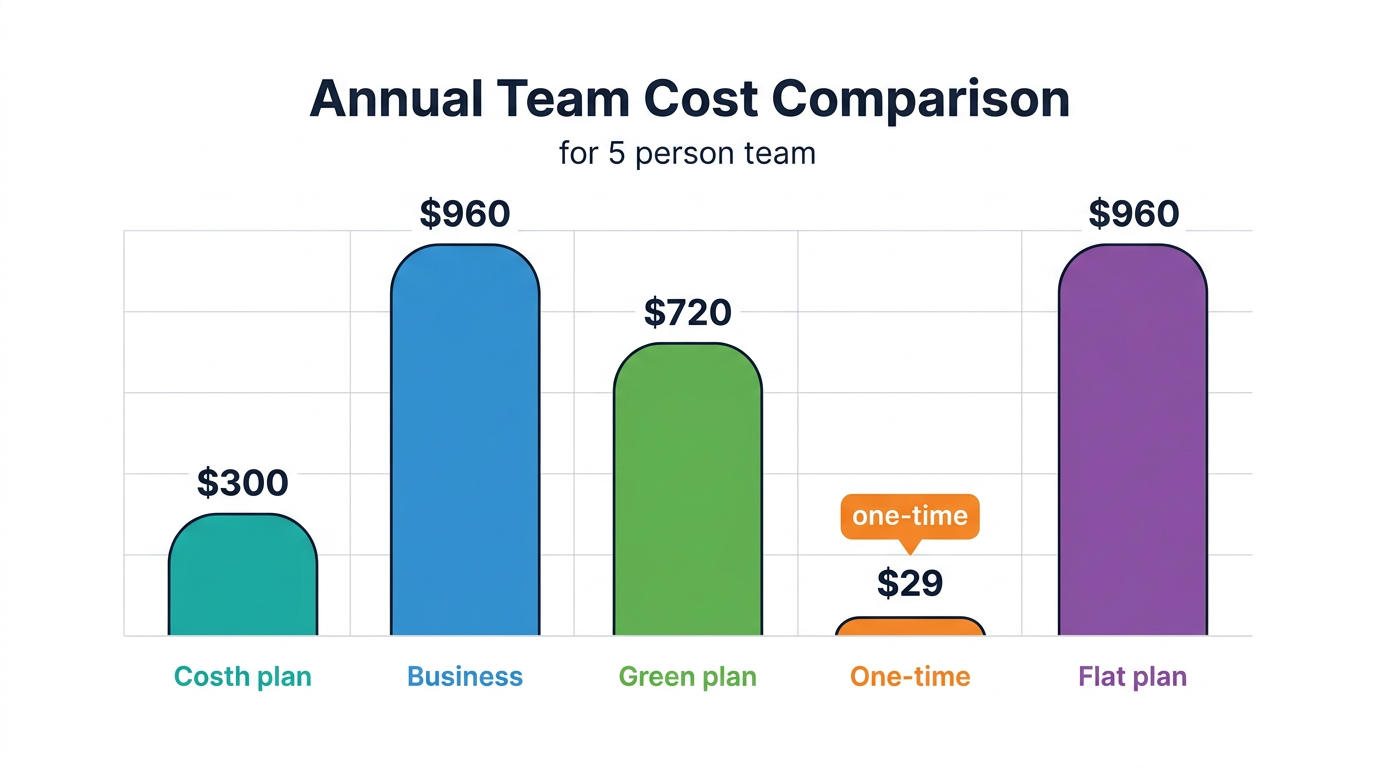
Let's make the cost difference concrete. Imagine you are a small business with 5 team members who all need to book meetings. Here is what you would pay monthly for each tool's team-capable plan:
Proximity Standard: 5 seats x $5 = $25/month (includes round-robin, routing forms, workflows)
Calendly Teams: 5 seats x $16 = $80/month (needed for routing forms and round-robin)
Cal.com Team: 5 seats x $12 = $60/month (includes round-robin, no routing forms)
TidyCal: $29 one-time, but no team features available at all
SavvyCal Teams: 5 seats x $16 = $80/month (includes team scheduling)
Over a year, the difference between Proximity and Calendly or SavvyCal for a 5-person team is $660. That is real money for a small business, enough to fund another software tool, a marketing campaign, or a nice team lunch every month.
What to look for beyond features and pricing
Features and pricing are the obvious comparison points, but there are a few other factors worth considering when you are choosing a scheduling tool for your business.
Setup time and learning curve
Every tool on this list can be set up in under 10 minutes. You connect your calendar, create an event type, and share your link. But the ongoing learning curve varies. Calendly and Proximity have the most intuitive interfaces, designed so you can configure new event types, workflows, and team settings without reading documentation. Cal.com has a steeper learning curve due to its extensive configuration options. TidyCal is simple by design (fewer features means fewer things to learn). SavvyCal is clean and focused but its calendar overlay takes a moment to understand.
For small business owners who do not want to spend time fiddling with settings, simplicity matters more than raw feature count.
Reliability and uptime
When your scheduling link goes down, prospects cannot book meetings. It is that simple. All five tools maintain high uptime, but it is worth checking each provider's status page and track record. Proximity maintains a 99.9 percent uptime guarantee. Calendly, as the largest player, has extensive infrastructure and a strong uptime record. Cal.com's uptime depends on whether you self-host (your responsibility) or use their cloud (their responsibility).
Data privacy and compliance
If you work in regulated industries like healthcare, finance, or legal, data handling matters. Check whether the tool stores data in your preferred region, whether they offer a Data Processing Agreement (DPA) for GDPR compliance, and whether they support SSO for security. Calendly has the most mature enterprise compliance offering. Proximity provides GDPR-compliant data handling and DPA upon request. Cal.com's self-hosted option gives you full control over data residency.
Integration ecosystem
No scheduling tool exists in a vacuum. It needs to play nicely with your calendar, video conferencing, CRM, email, and other tools. Calendly has the broadest native integration library, with direct connections to Salesforce, HubSpot, Marketo, and dozens more. Proximity supports Zoom, Google Meet, Microsoft Teams, Slack, and webhooks that connect to virtually anything. Cal.com has a growing integration library and benefits from community contributions. TidyCal and SavvyCal have more limited integrations.
If you rely heavily on a specific CRM or marketing platform, check the integration list before committing.
Booking page design and brand impression
Your booking page is client-facing. It represents your business. Some tools let you customize extensively (Proximity offers full CSS control on paid plans). Others lock customization behind higher tiers or do not offer it at all on free plans. If brand consistency is important to your business, pay attention to how much control each tool gives you over the look and feel of your scheduling page.
Our honest recommendation
There is no single "best" tool for everyone. But based on our analysis, here is how we would break it down:
Choose Proximity if you want the best value per dollar, anticipate growing your team, and need features like workflows, routing forms, and round-robin without paying enterprise prices. The free plan gets you started, and the $5 Standard plan is the most feature-rich offering in its price range.
Choose Calendly if you need the widest possible integration ecosystem and your organization already uses tools like Salesforce or HubSpot that have native Calendly connectors. You will pay more, but the integration depth can justify the cost for larger organizations.
Choose Cal.com if you are a developer or have a technical team, value open-source software, and want the option to self-host your scheduling infrastructure. The unlimited event types on the free plan is a real differentiator for individuals.
Choose TidyCal if you are a solo freelancer or consultant with simple scheduling needs and want to pay once and never think about it again. The $29 lifetime deal is genuinely hard to beat if you do not need team features or automation.
Choose SavvyCal if the guest booking experience is your top priority and you regularly schedule with high-value contacts who would appreciate the calendar overlay feature.
How to make the most of a free scheduling tool
Whichever tool you choose, here are some practical tips to get the most out of your free plan:
Optimize your booking page
Even on a free plan, you can control the basics: your name, photo, welcome message, and event description. Write a clear, warm description of what the meeting is about and what the guest can expect. Add a professional photo. These small touches make a real difference in how prospects perceive your business.
Set your availability intentionally
Do not just set "9 to 5, Monday through Friday" and call it done. Think about when you are at your best for meetings and when you need uninterrupted work time. Many successful professionals block off mornings for deep work and only offer afternoon meeting slots. Others batch all meetings on specific days. Your scheduling tool should enforce these boundaries automatically.
Share your link proactively
A scheduling link only saves time if people actually use it. Put it in your email signature, on your website, in your LinkedIn profile, and on your business cards. The more places your link appears, the fewer "When are you free?" emails you will receive.
Track your no-show rate
Even without fancy analytics, you can track no-shows manually. Keep a simple spreadsheet with your scheduled meetings and note which ones were no-shows. After a month, calculate your no-show rate. If it is above 15 percent, consider upgrading to a plan with automated reminders, because the time and revenue you recover will more than pay for the subscription.
Evaluate your needs quarterly
Your scheduling needs will evolve as your business grows. Review your tool usage every quarter. Are you bumping up against the one-event-type limit? Are you spending time on manual follow-ups that could be automated? Is your team growing and needing shared scheduling? If the answer to any of these is yes, it is probably time to explore paid plans.
The bottom line
Free scheduling tools have come a long way. In 2026, you can get a professional booking page, real-time calendar sync, timezone detection, and video conferencing integration without paying a cent. That is a remarkable amount of functionality for a small business just starting out.
But free plans have limits, and those limits will start to pinch as your business grows. The key is choosing a tool that not only serves you well today but also offers an affordable upgrade path when you need more.
Based on pure value, Proximity's combination of a functional free plan and a feature-packed $5-per-seat Standard plan makes it the strongest option for small businesses that want to start free and scale without breaking the bank. But every business is different, and we encourage you to try the free plans of any tools that interest you before committing.
The best scheduling tool is the one you actually use. Pick one, set it up, share your link, and start getting back the hours you have been losing to manual scheduling.
Start scheduling for free with Proximity. No credit card required.